


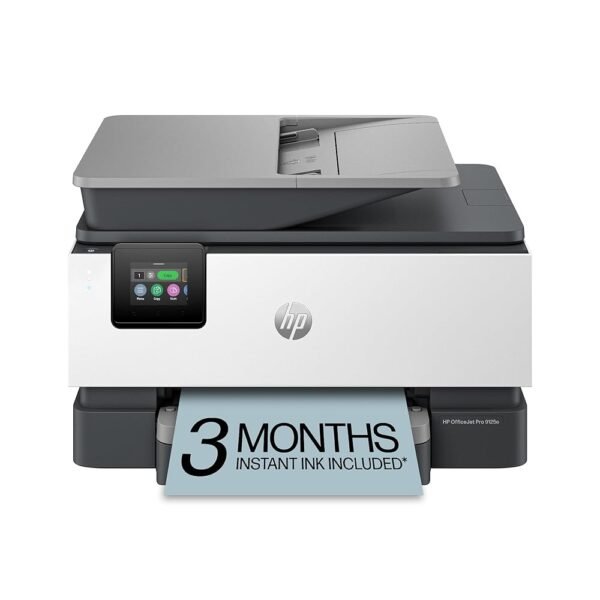
HP OfficeJet Pro 9125e Wireless All-in-One Color Inkjet Printer, Print, scan, copy, fax, ADF, Duplex printing best-for-office, 3 month Instant Ink trial included, AI-enabled...
Original price was: 264 CFA.179 CFACurrent price is: 179 CFA.
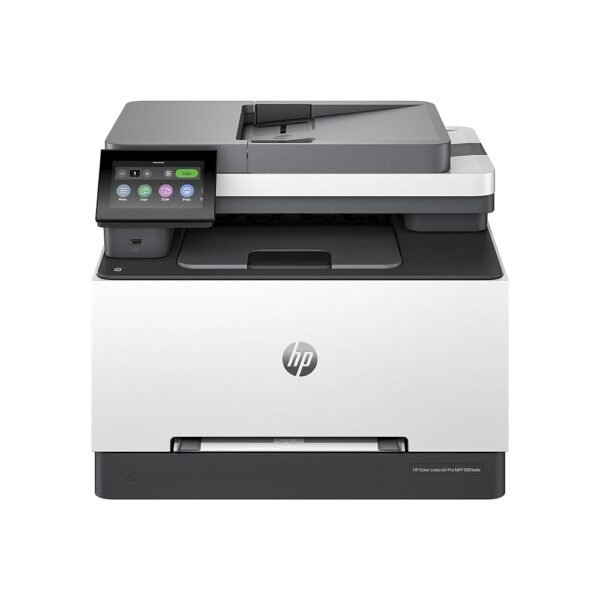
HP Color Laserjet Pro MFP 3301sdw Wireless All-in-One Color Laser Printer, Office Printer, Scanner, Copier, ADF, Duplex, Best for Office (499Q3F)
Original price was: 459 CFA.357 CFACurrent price is: 357 CFA.
-33%
![Canon PIXMA TS6420a All-in-One Wireless Inkjet Printer [Print, Copy, Scan], Works with Alexa](https://xampda.com/wp-content/uploads/2025/10/canon-pixma-ts6420a-all-in-one-wireless-inkjet-printer-print-copy-scan-.jpg "Canon PIXMA TS6420a All-in-One Wireless Inkjet Printer [Print, Copy, Scan], Works with Alexa")
![Canon PIXMA TS6420a All-in-One Wireless Inkjet Printer [Print, Copy, Scan], Works with Alexa](https://xampda.com/wp-content/uploads/2025/10/canon-pixma-ts6420a-all-in-one-wireless-inkjet-printer-print-copy-scan-1-1.jpg "Canon PIXMA TS6420a All-in-One Wireless Inkjet Printer [Print, Copy, Scan], Works with Alexa")
![Canon PIXMA TS6420a All-in-One Wireless Inkjet Printer [Print, Copy, Scan], Works with Alexa](https://xampda.com/wp-content/uploads/2025/10/canon-pixma-ts6420a-all-in-one-wireless-inkjet-printer-print-copy-scan-1-2.jpg "Canon PIXMA TS6420a All-in-One Wireless Inkjet Printer [Print, Copy, Scan], Works with Alexa")
![Canon PIXMA TS6420a All-in-One Wireless Inkjet Printer [Print, Copy, Scan], Works with Alexa](https://xampda.com/wp-content/uploads/2025/10/canon-pixma-ts6420a-all-in-one-wireless-inkjet-printer-print-copy-scan-1-3.jpg "Canon PIXMA TS6420a All-in-One Wireless Inkjet Printer [Print, Copy, Scan], Works with Alexa")
![Canon PIXMA TS6420a All-in-One Wireless Inkjet Printer [Print, Copy, Scan], Works with Alexa](https://xampda.com/wp-content/uploads/2025/10/canon-pixma-ts6420a-all-in-one-wireless-inkjet-printer-print-copy-scan-1-4.jpg "Canon PIXMA TS6420a All-in-One Wireless Inkjet Printer [Print, Copy, Scan], Works with Alexa")
![Canon PIXMA TS6420a All-in-One Wireless Inkjet Printer [Print, Copy, Scan], Works with Alexa](https://xampda.com/wp-content/uploads/2025/10/canon-pixma-ts6420a-all-in-one-wireless-inkjet-printer-print-copy-scan-1-5.jpg "Canon PIXMA TS6420a All-in-One Wireless Inkjet Printer [Print, Copy, Scan], Works with Alexa")
![Canon PIXMA TS6420a All-in-One Wireless Inkjet Printer [Print, Copy, Scan], Works with Alexa](https://xampda.com/wp-content/uploads/2025/10/canon-pixma-ts6420a-all-in-one-wireless-inkjet-printer-print-copy-scan-1-6.jpg "Canon PIXMA TS6420a All-in-One Wireless Inkjet Printer [Print, Copy, Scan], Works with Alexa")
![Canon PIXMA TS6420a All-in-One Wireless Inkjet Printer [Print, Copy, Scan], Works with Alexa](https://xampda.com/wp-content/uploads/2025/10/canon-pixma-ts6420a-all-in-one-wireless-inkjet-printer-print-copy-scan-1-7.jpg "Canon PIXMA TS6420a All-in-One Wireless Inkjet Printer [Print, Copy, Scan], Works with Alexa")
![Canon PIXMA TS6420a All-in-One Wireless Inkjet Printer [Print, Copy, Scan], Works with Alexa](https://xampda.com/wp-content/uploads/2025/10/canon-pixma-ts6420a-all-in-one-wireless-inkjet-printer-print-copy-scan-1-8.jpg "Canon PIXMA TS6420a All-in-One Wireless Inkjet Printer [Print, Copy, Scan], Works with Alexa")
![Canon PIXMA TS6420a All-in-One Wireless Inkjet Printer [Print, Copy, Scan], Works with Alexa](https://xampda.com/wp-content/uploads/2025/10/canon-pixma-ts6420a-all-in-one-wireless-inkjet-printer-print-copy-scan--150x150.jpg)
![Canon PIXMA TS6420a All-in-One Wireless Inkjet Printer [Print, Copy, Scan], Works with Alexa](https://xampda.com/wp-content/uploads/2025/10/canon-pixma-ts6420a-all-in-one-wireless-inkjet-printer-print-copy-scan-1-1-150x82.jpg)
![Canon PIXMA TS6420a All-in-One Wireless Inkjet Printer [Print, Copy, Scan], Works with Alexa](https://xampda.com/wp-content/uploads/2025/10/canon-pixma-ts6420a-all-in-one-wireless-inkjet-printer-print-copy-scan-1-2-150x141.jpg)
![Canon PIXMA TS6420a All-in-One Wireless Inkjet Printer [Print, Copy, Scan], Works with Alexa](https://xampda.com/wp-content/uploads/2025/10/canon-pixma-ts6420a-all-in-one-wireless-inkjet-printer-print-copy-scan-1-3-150x136.jpg)
![Canon PIXMA TS6420a All-in-One Wireless Inkjet Printer [Print, Copy, Scan], Works with Alexa](https://xampda.com/wp-content/uploads/2025/10/canon-pixma-ts6420a-all-in-one-wireless-inkjet-printer-print-copy-scan-1-4-150x142.jpg)
![Canon PIXMA TS6420a All-in-One Wireless Inkjet Printer [Print, Copy, Scan], Works with Alexa](https://xampda.com/wp-content/uploads/2025/10/canon-pixma-ts6420a-all-in-one-wireless-inkjet-printer-print-copy-scan-1-5-150x152.jpg)
![Canon PIXMA TS6420a All-in-One Wireless Inkjet Printer [Print, Copy, Scan], Works with Alexa](https://xampda.com/wp-content/uploads/2025/10/canon-pixma-ts6420a-all-in-one-wireless-inkjet-printer-print-copy-scan-1-6-150x100.jpg)
![Canon PIXMA TS6420a All-in-One Wireless Inkjet Printer [Print, Copy, Scan], Works with Alexa](https://xampda.com/wp-content/uploads/2025/10/canon-pixma-ts6420a-all-in-one-wireless-inkjet-printer-print-copy-scan-1-7-150x100.jpg)
![Canon PIXMA TS6420a All-in-One Wireless Inkjet Printer [Print, Copy, Scan], Works with Alexa](https://xampda.com/wp-content/uploads/2025/10/canon-pixma-ts6420a-all-in-one-wireless-inkjet-printer-print-copy-scan-1-8-150x100.jpg)
-
 Standard delivery
-
Express delivery
-
 Warranty 6 months
![[Bulk buying set] Panasonic LAMDASH shaver cleaning charger dedicated cleaning agents -6 pieces- (japan import) by Panasonic](https://xampda.com/wp-content/uploads/2025/10/bulk-buying-set-panasonic-lamdash-shaver-cleaning-charger-dedicated.jpg)

 Power Bank
 Mouse
Mouse
Ahvi & Zack –
For a wireless printer I thought it would be something similar to Bluetooth… Not quite.
First, there was no instruction manual in the box, just a single paper with a website instructing registration. (We do not live with a wifi connection so we had to walk this heavy machine up to a friend’s house for it’s set up and trial prints.)
So ok maybe the sit will have sine silly tutorials, an entire FAQ page, some other stuff. Nope.
The online manual is a gallery of pictographs, indicating that an app is required for the registration and use of the printer.
Ok. Maybe the app will have everything.
The app was frustrating to set up it’s wireless connection (not really needing wifi at all), and then when finally synced, it’s useless for printing anything other than pictures from my phone’s gallery. What I mean is, through the Canon PRINT app, you can’t access anything else. Which, after getting that far, the damn print quality is too grainy for pictures!
Upon finally getting access through the PRINT app yo my documents, it Still won’t print.
Any time we tried to access documents on my word appto print, the apps on my phone started to act weird, saying that the open document, that I was clearly looking at and trying to print from, was unavailable.
My husband was finally able to print from his phone, without the app, straight from other apps or files, directly from our email and even some music chords directly from a website! Yes that’s great, if that what I needed the printer for. When synced back up to my phone, the printer refused to access my apps or files, again saying they were unable to open them. Wtf did the PRINT app do to my other apps?
Once we were back home, I tried the scanner – the least frustrating thing about the whole day – printer is fine for text, not crisp but not as grainy as images. Struggles with copying stamps.) I am still having difficulty getting my documents from Microsoft Word to print, even when directly saved onto my phone’s storage rather than the cloud.
It vehemently refuses to connect to my computer without a 4-8 digit pin. Which I don’t have.
Oh, and the paper tray locks half sticking out, in print mode, only occasionally allowing to be pushed fully back under the body – I still don’t know how it went back in the first time and cannot get it to repeat the closure. Afraid to break the damn thing I left it out when I put it away for the day, wholly frustrated with the entire experience.
Today when trying again there is a repeated 1001 and 1003 error about the paper tray. I’ve taken it out, fixed the paper, put it back in about a dozen times. It’s fine. Still won’t print. Now it won’t print anything.
The ONLY nice thing about this printer (when you scan!) is that when the paper jams, the back of the machine can be almost be fully opened so you can access the paper trapped around the rollers. I’ll admit that was pretty sweet.
I got this printer for work and it’s by far the most infuriating printer I’ve ever used. If I could return it, I would, but that would cost more money than I purchased it for.
Alfredo E. –
Excelente impresora para uso doméstico y facilidad de instalación inalámbrica.
Brent & Lynne Simons –
My Canon PIXMA TR7020a All-in-One was officially “done.” So, with a stash of ink cartridges, I wanted to purchase something that used the same size ink cartridges. After researching, the Canon PIXMA TS6420a was a great fit. In less than 48 hours, it was delivered to my door via USPS. It took less than twenty minutes to remove my old printer and install the new! This was a great experience! Plus the printer is connected to Alexa, cell phones, tablets, and laptops. What a wonderful experience from start to finish! I would highly recommend the TS6420a.
MountainLover –
When I first received this printer, it was very slow to start and print. On occasion it wouldn’t start and I had to unplug the printer and start over. At that point I decided to return it. However, I was able to get some tech help and now it is working “fine.” Still not fast but working and worth keeping.
Crank –
Edit: Still going strong. No issues. I have no idea what the negative reviewers are experiencing, but it almost is assuredly user error of some sort with network, gear, or user control. This thing prints from Wi-Fi flawlessly in a basement setting from 6 feet away in my case, and it prints fairly fast without issue.
Inkjets are expensive if you use a lot of ink. This is not a laser printer, and you should not expect to be doing loads of printing for anything on it.
For printing photos, it actually has very decent quality, yet this one will use ink at a fast rate like most inkjets. I use this for shipping labels and occasional documents. Almost no photo printing at all. For those who print only sporadically, it’s a perfect option.
Compared to my last Canon, this one is more compact, easy to setup, Wi-Fi works flawlessly, and setup was basically one and done. I don’t understand the issues people are having, but it most likely comes down to your network and lack of expertise.
I manually posted my password on first boot, and even though I mostly have Wi-Fi disabled, when I turn it on with the printer, it works and prints without issue; no need to input password again or waste time finding a device. I never had even the slightest issue after password input.
It’s definitely not super high quality, but it also doesn’t have a bunch of stuff I don’t need. I like the lack of glossy plastic as well. This thing will fit almost anywhere, and for what it is looks nice and blends in well. We’ll see how long the power supply lasts.
Scanning works well, though, you will notice it is a little louder than some models. Printing has so far gone as well as before with a more expensive inkjet that died, and this doesn’t seem to use ridiculous amounts of ink when on the lowest ink usage settings. Still, the unit will definitely cost you if you print a lot. I always recommend a laser printer for people printing over 20 documents a month. No exceptions. Otherwise, you will be paying out the wazoo for ink on this thing, despite only having two cartridges.
Overall, Canon has done about all they can do for a compact inkjet. There isn’t much else to do for printers. You won’t be getting any major improvements over the years. This is about as small and efficient as it’s going to get, and even at that I barely notice the differences from ten years ago. Software is minimal and not invasive if all you want is drivers. I put the services in Win 10 on manual, and there isn’t anything else going on outside a scanner tool for my setup. With my needs this is a nice model so far. I hope it lasts.
Selina –
Pero el cartucho de acabo con 40 impresiones, por eso no la recomiendo
Deng PAN –
not work