*the device is free of charge. You need to prepare a SIM card that can access the Internet and insert it into the device to use it.
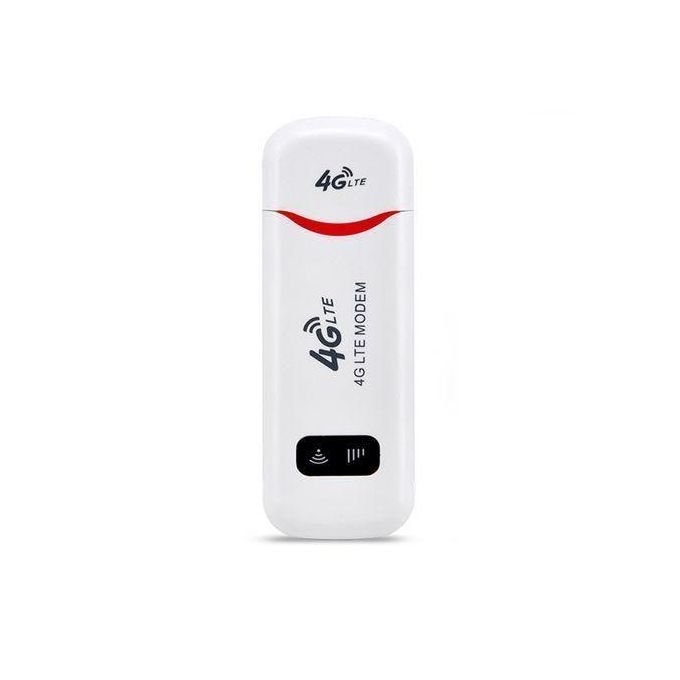
Wireless LTE WiFi Router 4G SIM Card Portable 150Mbps USB Modem Pocket Hotspot Dongle Mobile Broadband for Home Office WiFi Coverage
Feature:
Wireless access works on 3G, 4G and Wi-Fi networks.
Convenient and portable, 4GDONG001 is easy to use and stylish.
High-speed internet access for office and home.
It can also be used with laptops, notebooks, for UMPCs and MID devices.
Simply insert a SIM card to act as a wireless router, no setup required.
Specification:
Type: network card
Chip: Qualcomm
color: White
Size: 96*33*12mm
Weight: 26g
Material: plastic
Transmission rate: 150Mbps
USB: Standard USB interface
Band: 4G LTE FDD: B1/B3/B5; WCDMA UMTS: B1
WiFi: Support IEEE802.11b/g/n frequency band is 2.4G
4G speed: downlink 150Mbps
The WiFi transmission rate is 150Mbps, and the WiFi distance is about 5-10m
Support 8 devices that can be connected to WiFi at the same time and 1 USB user to access the Internet
Support Windows OS
Operating temperature: 0° to 35°C
Insert a standard SIM card, that is, a large SIM card.
How to use:
1. Push the back cover down.
2. Insert the SIM card with the core facing down
3. Plug the USB port into a power source for WiFi
4. Connect to WiFi, you can surf the Internet.
5. Connect to WIFI, open the website on the product in the browser to enter the background, the background can modify the WIFI name and password to add APN.
Troubleshooting for no network:
1.Check whether the SIM card is inserted correctly:The correct way to insert the SIM card is with the chip facing down. One end of the sim card is completely straight, while the other end has a slanted corner. Insert the card into the slot using the straight end.
2.If there is no problem with the card insertion, you need to wait a little longer for 1 minute for the first use because it needs to register the network, so it will be a little slower, and then it will be very fast in 30 seconds
3.Add APN:Some SIM card operators set specific network configurations,you need to manually add APN. The APN information needs to be obtained from the card vendor. To add APN: (1) Put a SIM card into the device and turn it on; (2) Connect your phone or computer to the device’s WIFI; (3) Open the IP address, log in to the backend, find the APN setting, click: Add, add the APN of this SIM card as required, and save it.
4.You can try to change the SIM card to see if it is a SIM card problem, or try to use it in another place to see if the signal is poor at the current location.







 Standard delivery
 Warranty 6 months
![[Bulk buying set] Panasonic LAMDASH shaver cleaning charger dedicated cleaning agents -6 pieces- (japan import) by Panasonic](https://xampda.com/wp-content/uploads/2025/10/bulk-buying-set-panasonic-lamdash-shaver-cleaning-charger-dedicated.jpg)

 Power Bank
 Mouse
Mouse
c’est vraiment super –
J’ai vraiment adoré le wifi
bonne qualité –
Super